
What is Free Youtube MP3 Converter (Freeware)?
Free Youtube MP3 Converter Freeware is a Youtube downloader and converter. It allows Extract and download music from YouTube movies and save it as MP3 files on your PC.
Free Youtube MP3 Converter Freeware Key Functions
- Autodectect youtube FLV file URL, download and convert at same time.
- This program gives you the option of creating MP3s at 40-bit rates and three sampling rates and in two channels.
- Batch-convert unlimited FLV files in the fast and easy WinZip-style interface.
- Encode FLV files into custom file sizes for use with portable MP3 players.
- Preview them before encoding.
- Multithreading are supported and the more files you convert the faster.
- Free YouTube to MP3 Converter contains no spyware or adware. It’s clearly free and absolutely safe to install and run.
Free Youtube MP3 Converter Freeware System Requirements:
OS: Windows 98/Me/2000/2003/XP/Vista, Window 7 or Window 8.
CPU: >750MHz Intel or AMD CPU
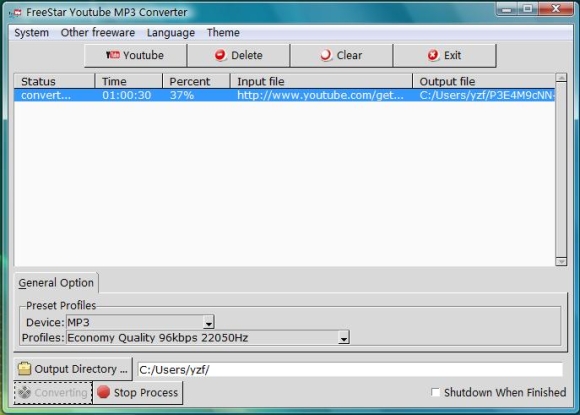
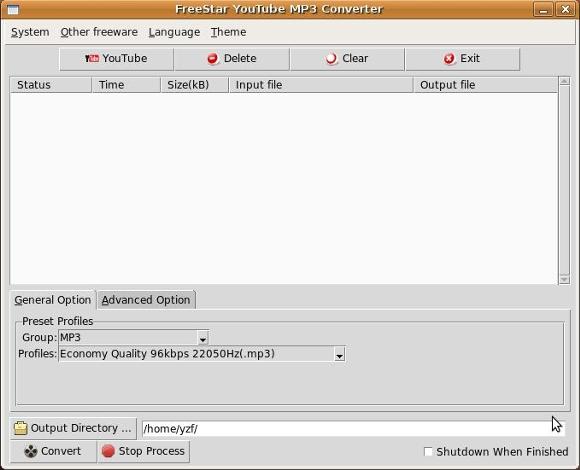
Free Youtube MP3 Converter Freeware Screenshot
Free YouTube MP3 Converter On Vista
Free YouTube MP3 Converter On Linux
Free Youtube MP3 Converter Freeware News
13-05-2013:Free Youtube MP3 Converter 4.0.1 release, due to Youtube updated.
07-04-2012:Free Youtube MP3 Converter 3.0.1 release, due to Youtube updated.
26-10-2012:Free Youtube MP3 Converter 2.0.8 release, due to Youtube updated.
05-06-2011:Free Youtube MP3 Converter 2.0.6 release, due to Youtube updated.
23-11-2010:Free Youtube MP3 Converter 2.0.3 release, due to Youtube updated.
15-02-2009:Free Youtube MP3 Converter (Ubuntu > 8.04 ) 2.0.1 first release.
15-02-2009:Free Youtube MP3 Converter 2.0.1 update.
13-11-2008:Free Youtube MP3 Converter 1.0.1 first release.
Free Youtube MP3 Converter Freeware Support

Should there be any queries, please don’t hesitate to contact me by freestar666@gmail.com
Free Youtube MP3 Converter Freeware Awards




Free Youtube MP3 Converter Freeware Articles
How to download Youtube video to more formats?
Other software about Free Youtube MP3 Converter Freeware
Free video downloader and converter
Youtube MP3 Converter Downloads
 |
MS Windows 95,98,NT,2000,XP,Vista,Win 7 |  |
 |
Linux x86 binary, Ubuntu, Debian, Fedora, openSUSE, Mandriva, Mint, Gentoo, Slackware,PCLinuxOS, CentOS | |
Comments
23 Jul 2010, 17:14
24 Aug 2010, 08:30
24 Aug 2010, 18:13
13 Nov 2010, 07:57
25 Mar 2011, 18:55
10 Jun 2011, 20:24
16 Jul 2011, 12:45
gracias
14 Aug 2011, 07:26
21 Aug 2011, 17:33
03 Sep 2011, 03:36
08 Sep 2011, 11:00
20 Oct 2011, 01:04
01 Jan 2012, 17:06
Open internet browser and go on YouTube website. Find and play the item you want. Copy/paste the url (the bit at the top of the screen that starts //www.youtube.com/watch/……) into the box that says “please copy url” (note. The ones in that box already are examples). Click download button.
When finished click on file in FreeStar box. Make sure Output Directory is where you want the file to be sent to. Click on Convert button. When it’s done you’ll hear a bell and it the status will say “ok”.
On your computer (ie. Not in FreeStar or YouTube) open the directory where you told the file to be sent to. You’ll see a weird named file (it’s the last part of the url name in YouTube). Open the file with your chosen software to check it’s downloaded alright. Rename it!!
… and you’re done!
20 Jan 2012, 16:03
02 Mar 2012, 11:41
Hopefully it will work out wellKing
03 Jul 2012, 16:51
10 Jul 2012, 06:09
15 Jul 2012, 16:07
16 Jul 2012, 15:34
14 Sep 2012, 13:53
19 Jun 2013, 22:14
17 Jul 2014, 04:02
excelente